One key, many models: OpenRouter in AI-Git-Bot
A dedicated OpenRouter integration sends routing policy with every request: region choice for EU or US processing, zero data retention enforced per request, and an automatic router that picks a model per call. What the bot pins, what it refuses, and where the settings are.
AI-Git-Bot supports several AI providers, and OpenRouter is the one that is a router rather than a model vendor. A single inference key opens a catalog of model families, and the request carries policy with it: which region may process it, whether the endpoint is allowed to retain it, and which parameters the endpoint has to support.
The dedicated OpenRouter provider type is not the same thing as pointing the
generic OpenAI integration at openrouter.ai. The generic path speaks plain
OpenAI and hopes the gateway behaves; the dedicated one speaks OpenRouter’s own
dialect, sends a routing policy on every call, and validates the key before it saves
anything. This article covers that integration: the setup, the routing and privacy
section, what automatic model routing can and cannot do inside the bot, and where to
watch the spend. The reference documentation:
USER_GUIDE.
Why put a router in front of a review bot
The reason is not “more models”. It is that the same account serves every bot:
- One key, several families. A review bot on a frontier model, a triage bot on a cheap one and a coding agent on whatever is strongest for tool calls can all point at one integration — or at several integrations with the same key and different model IDs.
- Model choice is a text field. Switching the model of a bot is an edit to the
integration, not a new vendor contract, and the suggested IDs in the dropdown are
examples rather than a catalog. Type any
author/modelID. - Spend in one place. OpenRouter credits pay for everything, and the per-integration token log in AI-Git-Bot lines up with the activity view on the OpenRouter side.
- Data policy as configuration. Region and retention are properties of the request, so a bot reviewing a customer repository can be stricter than the bot reviewing your own.
That last point is the part that matters in regulated repositories, and it is the part the bot actually enforces instead of passing along.
Setting up the integration
- AI Integrations → New. Set Provider Type to
OpenRouter. - API Key — an inference key. On save the server calls
/v1/keyon the selected official host, rejects management and provisioning keys, and checks that the key is allowed in the selected region. A key that fails the check is not stored. - Routing and privacy — region, data collection and ZDR, described below.
- Model — a concrete ID such as
deepseek/deepseek-v4.1-flash, or one of the routers. - Max Tokens and Context Window — the response limit and the model’s real window. OpenRouter passes both through to whichever endpoint serves the request, so a wrong context window is compounded by a router you did not pick.
- Enable native tool calling — on for models that call tools reliably. With it off, the bot describes the tools in the prompt and parses a JSON answer.
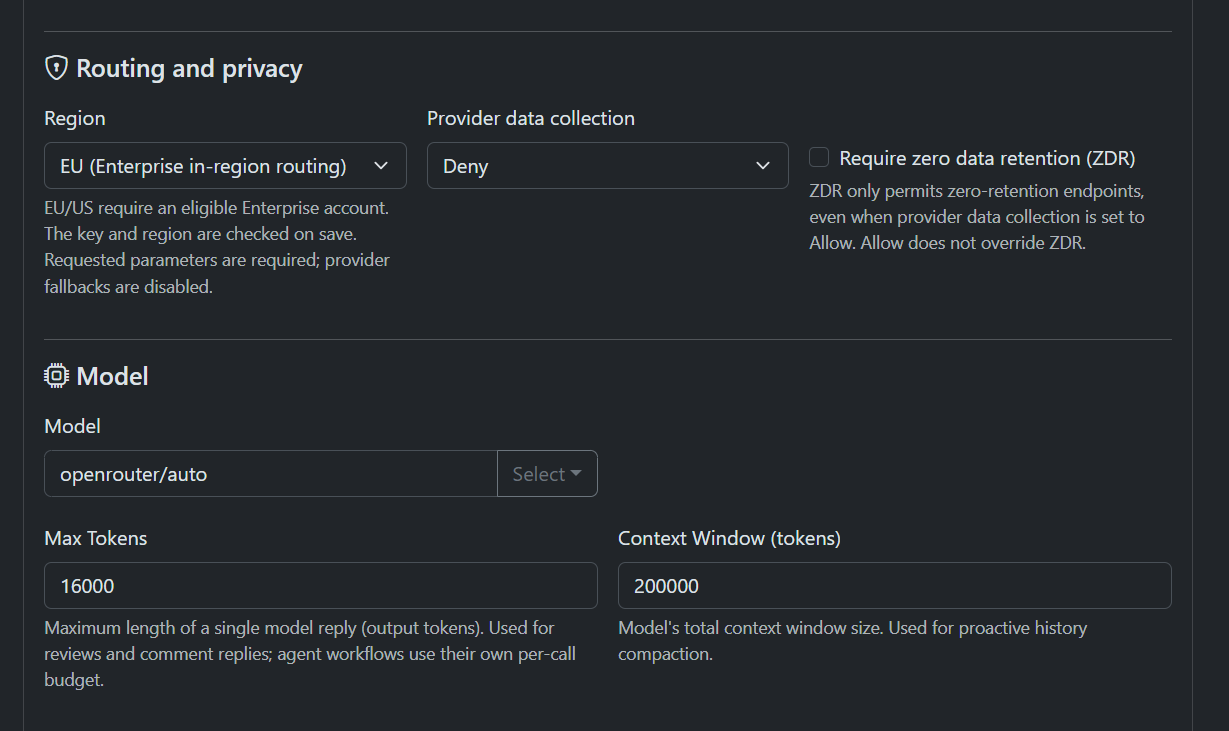
The API URL field is not editable for this provider — it is derived from the region and shown as plain text, so the host and the policy cannot drift apart. A gateway of your own in front of OpenRouter is a different situation: use the generic OpenAI provider for that, because a custom root would break the region check.
Automatic model routing
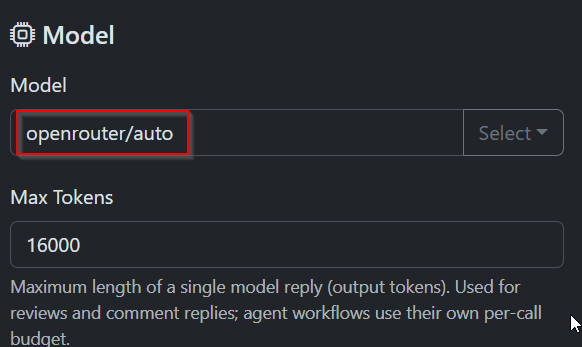
OpenRouter’s routers are model IDs. openrouter/auto rates each request and picks both
a model and a reasoning effort for it; openrouter/auto-code runs on the same engine
with a policy tuned for coding agents and harnesses. Enter either in the Model field
like any other ID and the bot sends it unchanged.
The pool in step two is where the bot’s settings become visible. The router only
considers models that the account’s guardrails, the ZDR requirement, provider
restrictions and your BYOK keys allow — so turning ZDR on narrows the router as much as
it narrows a pinned model. What the router cannot read is per-request router settings:
allowed_models, excluded_models and cost_tier travel in a plugin block, and the bot
disables plugin overrides on every request. Sets that have to be request-specific belong
on the account or in a guardrail.
There is a trade-off worth naming. Routing makes the model a variable in a pipeline whose output you review as if it were deterministic: two rounds of the same agent run can be served by different models, and a review that looked thorough yesterday looks hurried today because the router picked cheaper. For production reviews, pin a concrete ID and use a router for experiments, for triage, or where the traffic mix is genuinely unknown. OpenRouter’s response tells you which model actually served the call, and the bot records the integration and the token counts, so a surprising diff is traceable rather than mysterious.
Region choice
Three options, each with a fixed API root:
| Region | API root | What it means |
|---|---|---|
| Global (default) | https://openrouter.ai/api |
No regional restriction; any eligible endpoint may serve the request. |
| EU | https://eu.openrouter.ai/api |
Prompt and completion are processed in the EU/EEA, the UK or Switzerland. |
| US | https://us.openrouter.ai/api |
Prompt and completion are processed in the US. |
In-region routing is a paid OpenRouter account tier, not a free toggle, and it fails
closed: if no endpoint in that region can serve the model, the request errors instead of
quietly leaving the region. That is the behaviour you want in a review pipeline, and it is
also the reason a model that works on Global can be unavailable under EU — the
endpoint has to be onboarded for the region.
The bot does not take your word for the entitlement. On save it reads the key’s
allowed_data_regions and rejects a region the key does not list; an omitted list is
accepted only for Global. Changing the region later re-checks the retained key, so a
plan downgrade surfaces on the next edit rather than on the next review.
ZDR and data collection
Two settings, two independent filters, both on the integration:
- Provider data collection —
Deny(default) orAllow. Sent asdata_collectionin the routing policy. - Require zero data retention (ZDR) — off by default. When on, only endpoints with a zero-retention policy are eligible.
The ordering matters and the bot does not soften it: ZDR wins over Allow. With ZDR
enabled and data collection set to Allow, retention-free endpoints are still the only
ones considered — Allow does not override ZDR, it only stops being the constraint that
binds. Both values are stored as selected rather than normalised into something
contradictory, and if no endpoint satisfies the combination the request fails explicitly
instead of falling back to a weaker policy.
Two details that make this hold up rather than just look good:
- No plugins. The bot disables OpenRouter’s plugins on every request — web, file parser, response healing, context compression and the Pareto router. Those run outside the inference path and carry their own retention, and context compression in particular rewrites the prompt in ways a tool-calling agent did not plan for. Account-level Prevent overrides settings can force plugins back on; keep the OpenRouter account free of forced plugins if the policy is the point.
- No retained payloads by default. The optional raw-payload audit
(
AI_USAGE_RAW_PAYLOADS_ENABLED) is off, so enabling ZDR does not leave a copy of the prompt in your own database.
One honest limitation belongs here: OpenRouter’s own retention documentation describes a content-screening exception that applies to ZDR traffic as well. If your requirement is a signed data-processing agreement rather than a routing flag, read their ZDR page and their terms before you treat the checkbox as the whole answer.
What the bot pins on every request
The routing policy is not the only thing that is fixed. Each OpenRouter call from AI-Git-Bot sends:
require_parameters: true— the endpoint must support the parameters the bot sends, which for an agent run means tool calling and the token limits. An endpoint that would silently ignore tools is not eligible.allow_fallbacks: false— no provider fallback. A request that no eligible endpoint can serve fails. For a review this is the right trade: a fallback to a provider with a different retention policy or a weaker parameter set is worse than a red build.max_tokens, notmax_completion_tokens— OpenRouter’s token-cap dialect. The generic OpenAI integration keeps using the OpenAI field name.- The plugin opt-outs above.
- App attribution headers, so the traffic shows up under the AI Git Bot entry in OpenRouter’s app directory and rankings.
Reasoning details from models that emit them are preserved across tool continuations in memory, separately from the visible answer and the session history — the same mechanism that keeps a native tool-calling loop consistent on the other providers.
Watching the spend
The AI usage page logs every interaction with input, output, cache-write and cache-read tokens per integration. The cache columns are the ones to look at first with OpenRouter: an agentic review re-sends the same prefix every round, provider prompt caching passes through, and a run whose cache-read count stays at zero is paying full input price on every round. That is usually a model without caching on the serving endpoint, not a bot misconfiguration.
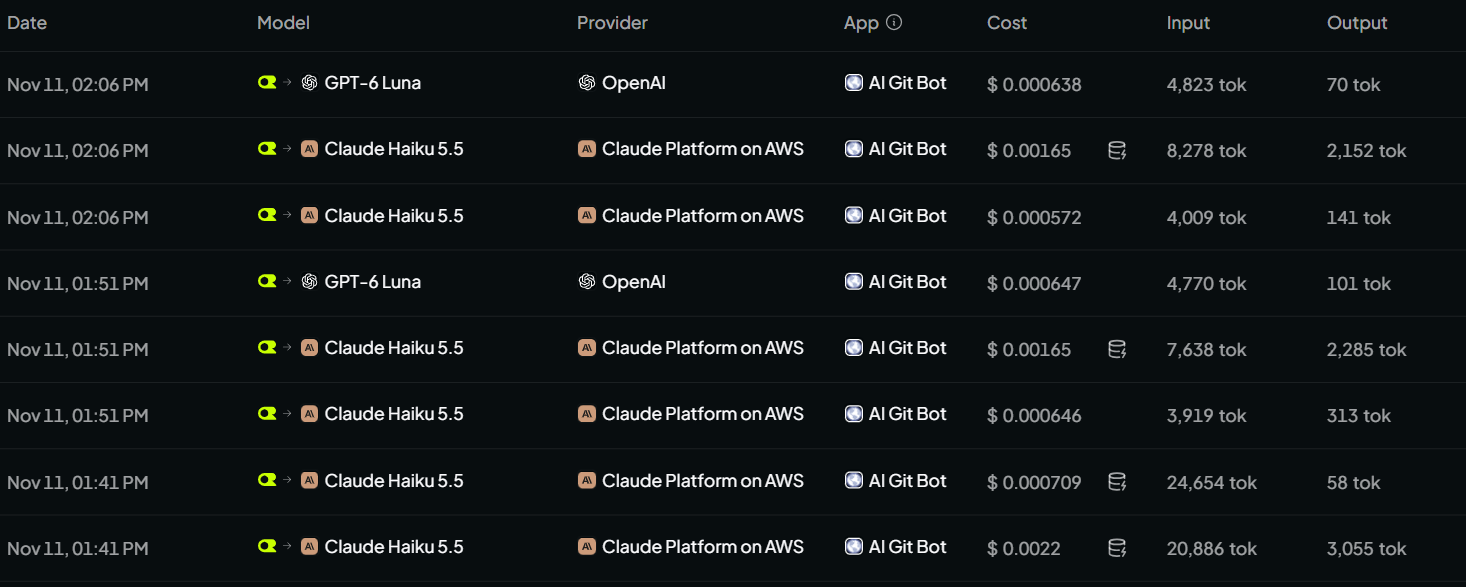
Reconcile against OpenRouter’s activity view when the numbers look off: the bot counts what the provider reported, and OpenRouter is the side that knows the price of the model that actually served the call.
Errors and what they mean
- HTTP 401 on save — the key was rejected. The response body is not surfaced or logged; provider error bodies can contain account details.
- HTTP 402 / 429 during inference — credits exhausted or rate limited. Check the OpenRouter account, not the bot.
- HTTP 404 during inference — the model is unavailable, or no route satisfies the
region and ZDR policy. With
EUselected this is the common shape of “works on Global”. - “Provider overloaded” — 503/529 from the upstream endpoint. The retry decorator backs off and retries, and posts a comment on the pull request or issue saying when the next attempt happens. Authentication, prompt-too-long and malformed responses are not retried; they are handled or reported.
When not to use it
If the requirement is a provider contract with the model vendor directly — a specific data-processing agreement, a dedicated deployment, a fixed price — the router sits in the way, and the bot’s Anthropic or OpenAI integration is the shorter path. OpenRouter earns its place where you want several model families, one bill, and a policy you can set per request. Within the bot, that is the difference between “this integration reviews with this model” and “this integration reviews with this model, in this region, without retention”.
Feedback is welcome — use the contact form, send an email, or open an issue on GitHub.